Restore DISP button to default function

ckqualls

Senior Member
I re-programmed the DISP button to open My Menu". I would like to restore to its default function.

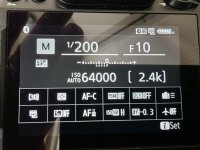
I go to "Custom controls (shooting) and select DISP. button. I thought the "DISP Cycle live view info display" was it and I selected thar. Now when I press DISP I get what is in the attached photo.I don't believe that was the button's default function. Or am I mistaken?

Firmware 2.0
 

Attachments
  • 20260207_031806.jpg
    20260207_031806.jpg
    1.6 MB · Views: 5
Last edited:

Paliswe

Senior Member
The default function for the DISP button is to cycle the shooting display. The items displayed can be selected using Custom Setting d19.
To assign DISP button to default function, select f2 and find DISP. From there you can choose DISP in the menu, and you're back to square one.
 

ckqualls

Senior Member
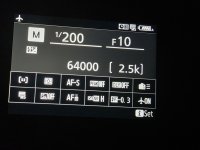
D19 is "Half-press to cancel zoom (MF). And I did reset DISP to DISP but got screen attached. From that screen no controls change anything. Firmware 2.0. Thanks for your help
 

Attachments

  • 20260207_135013.jpg
    20260207_135013.jpg
    2.1 MB · Views: 3
Last edited:

Paliswe

Senior Member
I was reading from Nikon reference manual, which referred to a previous version of the firmware.
When I check on my camera Z6iii the Custom Setting has moved to d20 and d21, where you can check/uncheck alternatives for the display and EVF. If only alternative 5 is checked you will get the display shown in your picture.
For each display (1-4), you can go one step further down and in detail decide what shall be shown.
Sorry for the confusion.
One thing I found out is that when you select d20, choose it, you will in the next picture see d19 in the upper left corner. d21 shows d20 in the upper left corner, so the guys at Nikon has inserted a new function for d19, moving down d19 to d20 and d20 to d21, but didn't change what is shown on next level
 
Last edited:
Top