
Newquay Dave
New member
Hi
I have just purchased a new Coolpix P950. I cannot seem to pair the camera with my iPhone using Snapridge. I have checked Airplane mode is off and re formatted the SD card.
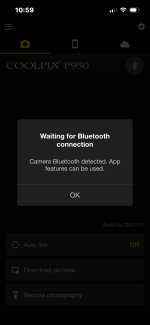
When setting up Snapbridge it seems to go though the setup process and shows bluetooth is working on the Snapbridge front page, but when I go into the iPhone bluetooth menu it shows as not connected, and I cannot get any further with downloading photos.
See attached image
Also, if I try to use wifi on Snapbridge it comes up with the following error message:
NOT_EXIST_DCIM_DIRECTROY
Any advice will be appreciated
Thanks
Dave
I have just purchased a new Coolpix P950. I cannot seem to pair the camera with my iPhone using Snapridge. I have checked Airplane mode is off and re formatted the SD card.
When setting up Snapbridge it seems to go though the setup process and shows bluetooth is working on the Snapbridge front page, but when I go into the iPhone bluetooth menu it shows as not connected, and I cannot get any further with downloading photos.
See attached image
Also, if I try to use wifi on Snapbridge it comes up with the following error message:
NOT_EXIST_DCIM_DIRECTROY
Any advice will be appreciated
Thanks
Dave
Attachments
Last edited:

