+ Reply to Thread
Results 1 to 10 of 11
- 12-05-2011, 12:10 PM #1
Making Christmas Tree lights "twinkle" (?)
I know if there is anywhere to get advice on this, it's here :-) If this is not the appropriate place to have posted, please feel free to move it.
I was trying to get a shot of my Christmas tree with the lights on with the "twinkle" effect. I am using a 50mm F1.8 lens and have played with shutter speed and aperture but don't have quite the effect I am after. I managed this outside and pulled up the exif readings, then realized it is pretty pointless as the lighting and distance from the lights was completely different. To give you an idea of the lighting, I had all the lights off in the room aside from the (many) on the tree, so aside from the strung lights, there is almost no other light in the room.
By the way, I don't need the photo for any particular reason, other than that I want to know how to do it, lol. I also have an 18-105 lens and I'm shooting with a D90 if that info is helpful.
Thanks guys
› See More: Making Christmas Tree lights "twinkle" (?)
- 12-05-2011, 12:10 PM
12-05-2011, 12:21 PM #2Re: Making Christmas Tree lights "twinkle" (?)
If by "twinkle" you mean the appearance of points at each light, then
I would look at getting a cross cut filter for your lens. I think its a 67 mm.
Just a thought.
12-05-2011, 12:26 PM #3Re: Making Christmas Tree lights "twinkle" (?)
Erm, what's a cross cut filter? (You'll have to excuse my ignorance) :-)
You're right -the 18-105 is a 67mm filter (the little lens is 52)
12-05-2011, 12:59 PM #4Re: Making Christmas Tree lights "twinkle" (?)
The ONLY person born knowing everything was my ex-wife.

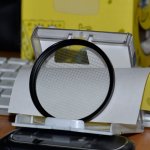
This is a cross cut filter. When you take a picture of ANYTHING with bright lights, you will get a "pointed light burst" at the intersection of each cut.
The prominence of each "burst" is dictated by the angle and proximity of the light at each intersection.
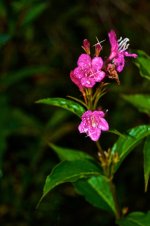
Like this one.

Hope this helps.
12-05-2011, 01:02 PM #5Re: Making Christmas Tree lights "twinkle" (?)
It helps a LOT! Thank you so much for posting that picture of the flower too. I wouldn't have thought of using something like that in day/natural light. I did do a search and didn't come up with anything so I assume I would need to look at a specialist photography store for something like that? Or does it have another name. I did see star filters but they look different to the picture of the one you posted. Thank you for your help :-)
12-05-2011, 01:09 PM #6Re: Making Christmas Tree lights "twinkle" (?)
Star filters, cross filters, cross cut filters or star burst filters are all the same thing. The number of cuts dictates the maximum amount of "stars" that you will get.
You can easily overwhelm a shot with light bursts, so this is a perfect case of "less is more".
Search "Star Filters" at Amazon.com and you will find what you want.
Half the fun of photography is trying out different things. Get a few filters and try them out.
Now go play!
12-05-2011, 01:14 PM #7
12-05-2011, 07:59 PM #8Re: Making Christmas Tree lights "twinkle" (?)
12-05-2011, 08:01 PM #9Re: Making Christmas Tree lights "twinkle" (?)
No worry. I'm glad its working out for ya!
You need anything else, just holler.
12-07-2011, 12:32 PM #10
Senior Member
- Join Date
- Jul 2010
- Location
- North Texas
- Posts
- 417 - liked 135 times
- Image Editing
- Yes
- Images
- 12
Re: Making Christmas Tree lights "twinkle" (?)
-> Don
If we couldn't laugh, we would all go insane. - Jimmy Buffett
12-07-2011, 12:32 PM
Similar Threads
- Learning Photography
- Other Photography Equipment
- D40/D40x
- General Compact Digital Cameras
- Coolpix Sxxxx

3Likes
LinkBack URL
About LinkBacks
Reply

"New" D700 Images
Today, 05:41 AM in D700